Legacy code is the skeleton of every successful company. It runs billing, processes orders, and holds business rules that nobody has fully understood in years. It’s not going anywhere, and that’s exactly why modernizing it matters.
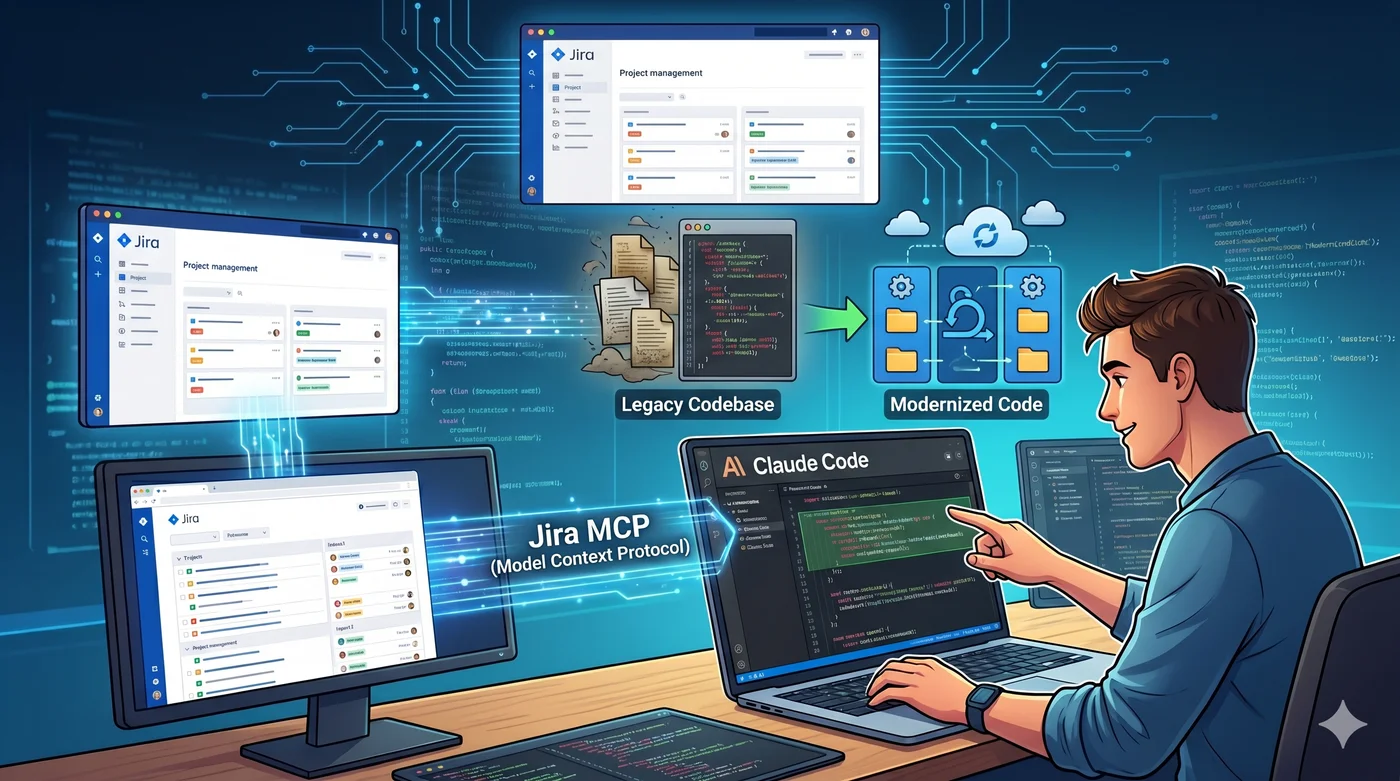
For the past several months, I’ve been using Claude Code alongside the Jira MCP and a carefully crafted CLAUDE.md to navigate and implement changes on legacy Java codebases. This article is a practical breakdown of that workflow: what it looks like, why it works, and where it still fails.
The Problem with Legacy Codebases
Before diving into the setup, it’s worth naming the actual problem. Legacy code isn’t hard because it’s old. It’s hard because of everything that surrounds it:
- No documentation (or worse, documentation that lies)
- Implicit business rules buried in conditionals nobody dares touch
- Missing tests that would tell you if your change breaks something
- Original authors gone, their knowledge left with them
- Fear, the real killer of velocity on legacy projects
The traditional approach is to read the code, ask around, and make cautious changes. It works but it’s slow. An AI agent doesn’t solve all of this, but it dramatically reduces the time spent on the archaeology part.
The Stack
My setup has three components:
1. Claude Code
Claude Code is Anthropic’s agentic coding tool. It runs in your terminal, has access to your filesystem, can execute commands, and iterates on its own. Unlike a chat interface, it doesn’t just suggest code it reads files, makes changes, runs tests, and fixes errors.
What makes it powerful for legacy work is that it can navigate a large codebase without me directing every step. I give it a task and context, and it figures out which files to read.
2. CLAUDE.md The Project Handbook
Every project gets a CLAUDE.md at the root. This file is Claude Code’s onboarding document. It tells the agent what it needs to know before touching anything.
Here’s the kind of content I put in a CLAUDE.md for a typical enterprise Java project:
## Overview

Maven multi-module Spring Boot application, Java 17.
Two databases: PostgreSQL (application data) + Oracle (legacy ERP, read-only).
All services run in Docker locally.

## Daily commands

### Environment
docker compose up -d          # start all containers
docker compose logs -f api    # follow API logs
docker compose down           # stop all containers

### Build & run
./mvnw clean install -DskipTests   # full build
./mvnw -pl api spring-boot:run     # run API module only
./mvnw test -pl api                # run unit tests for api module

### Database
# PostgreSQL localhost:5432, db: appdb, user: appuser
./scripts/db-reset.sh              # drop + recreate + seed local DB
./scripts/db-load-dump.sh prod     # load anonymized prod dump (slow, ~5min)

# Oracle (legacy ERP) read-only, localhost:1521
# Never write directly use the dedicated OracleService wrapper

## Architecture
- api/          REST controllers + business logic
- domain/       Entities, repositories (Spring Data JPA)
- integration/  Adapters to Oracle ERP (polling via Apache Camel)
- scheduler/    Batch jobs (Spring Batch)
- common/       DTOs, utils, shared constants

## Known landmines
- Oracle ERP is read-only never attempt a write, it will corrupt downstream data
- OrderService.createOrder() is NOT idempotent always check for duplicates first
- LegacyCodeMapper uses reflection, adding new fields breaks silently without tests
- Do NOT add @Transactional to scheduler jobs they hold connections for minutes

## Git
Branches: main (prod), develop (integration), PROJ-XXXX-short-description (feature)
Commits: always prefix with ticket "PROJ-123: add VAT calculation for EU orders"
Push: --force-with-lease only, never --force
This file is the difference between Claude Code making a confident, correct change and blindly breaking something. The more specific you are, the better the results.
The Known landmines section is the most valuable part. These are the things that would take a new developer weeks to discover. Writing them down once saves everyone including the agent from painful regressions.
3. Jira MCP
The Jira MCP exposes your Jira project as a set of tools that Claude Code can call. In practice, this means Claude Code can:
- Read the ticket description, acceptance criteria, and comments
- Understand the full context before writing a single line
- Reference related tickets and sub-tasks
- Post a comment back with a summary of what was done
But the most powerful thing I’ve built on top of this is a custom skill in CLAUDE.md:
## Available skills

| Command                    | Description                                              |
|----------------------------|----------------------------------------------------------|
| `/test-ticket <PROJ-XXXX>` | Run Playwright acceptance tests for a Jira ticket        |
| `/mr-push [app\|connector]`| Amend + rebase + force-push with lease                   |
| `/mr-comment [reply\|post]`| Read and reply to GitLab MR comments                    |
| `/build [app\|connector]`  | Build the app or connector                               |
| `/sonar [app\|connector]`  | Run local SonarQube analysis                             |
The /test-ticket skill is the one that changed how I work. I give it a ticket reference, Claude Code reads the acceptance criteria from Jira, maps them to the right Playwright test files, runs them, and reports back. The full feedback loop write code, test against the actual ticket without leaving the terminal.
Honest caveat though: it burns a significant number of tokens per run. Reading the ticket, navigating the test files, running Playwright, interpreting results it all adds up. On a complex ticket with multiple acceptance criteria, a single /test-ticket run can cost more than the rest of the session combined. I still use it, but selectively not as a default step on every change.
The Workflow: From Ticket to Implementation
Here’s how a typical session looks.
Step 1 Kick off with a ticket reference
I open a terminal in the project root and start Claude Code with a simple prompt:
Read JIRA ticket PROJ-4821 and implement the requested change.
Use CLAUDE.md for project context before touching any files.
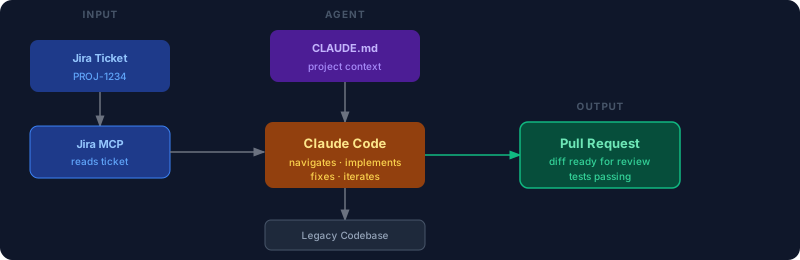
That’s it. Claude Code reads CLAUDE.md first, then calls the Jira MCP to fetch the ticket, reads the description and acceptance criteria, and starts exploring the codebase.
Step 2 Claude Code explores the codebase
Based on the ticket content, the agent searches for relevant files. For a ticket like “Fix incorrect VAT calculation for B2B orders in Germany”, it will:
- Search for
VAT,tax,germany,B2Bacross the codebase - Read the relevant service and model files
- Follow the call chain to understand what feeds the calculation
- Check if there are existing tests for that flow
This is the archaeology phase. Doing it manually takes 30-60 minutes on an unfamiliar codebase. Claude Code does it in 2-3 minutes.
Step 3 Implementation with guardrails
Claude Code proposes changes based on what it found. Because CLAUDE.md establishes the constraints (no Lombok, amounts in cents, don’t touch legacy_ tables), the changes respect the project’s existing conventions.
If the agent is uncertain, it asks. If it finds something suspicious in the code that might be related to the ticket, it surfaces it.
Step 4 Review and iterate
I review the diff, run the tests, and iterate. Claude Code doesn’t replace the review it compresses the time spent before the review.
What Actually Works Well
After several months of using this workflow, here’s what consistently delivers value:
Understanding data flows: tracing how a value gets from the database to the API response through 8 service layers is tedious. Claude Code handles it well.
Writing tests for untested code: this is underrated. Before making a change, I ask Claude Code to write characterization tests for the relevant code. It reads the existing behavior and writes tests that describe it. These tests catch regressions during the change.
Surfacing related code: the agent often finds code that’s related to the ticket but wasn’t mentioned in it. Duplicate logic, dead code, a similar function in another module. This knowledge compounds over time.
Translating ticket language to code: business stakeholders write tickets in business language. Developers have to mentally translate. Claude Code bridges that gap more reliably than I expected.
What Doesn’t Work Yet
Honesty matters here. This workflow isn’t magic.
Implicit business rules: if the rule isn’t written down (in CLAUDE.md, comments, or tests), Claude Code won’t infer it from code patterns. A legacy codebase full of silent assumptions is still full of silent assumptions.
Highly coupled modules: when everything depends on everything, the agent struggles to make a scoped change without touching too much. The fix there is architecture, not prompting.
Token costs on automated test loops: automating the full test-against-ticket cycle is technically impressive but expensive. The more context the agent needs to load (ticket + test files + Playwright output), the more tokens it burns. Some automations that look great on paper don’t survive contact with a real monthly bill.
100% autonomous operation: Claude Code is a senior junior developer. It’s fast, thorough, and follows instructions well. But it still needs a human to define what “correct” means and to validate the output. Treating it as a fully autonomous agent leads to bad outcomes.
Cross-cutting concerns: security, performance, observability. These require judgment that goes beyond implementing what the ticket says. I always review for these separately.
The CLAUDE.md Is the Real Unlock
If I had to name the single most impactful part of this setup, it’s the CLAUDE.md not the model, not the tools.
A good CLAUDE.md captures institutional knowledge that would otherwise live only in the heads of the people who’ve worked on the project longest. Writing it forces you to articulate things that are usually implicit. And once it exists, any developer (human or AI) onboards faster.
I update it every time I discover something that surprised me during a session. Over time, it becomes the living documentation the project never had.
Conclusion
The combination of Claude Code, Jira MCP, and a well-maintained CLAUDE.md doesn’t eliminate the hard parts of legacy modernization. It compresses the time spent on the mechanical parts reading code, tracing flows, writing boilerplate, so that more of your time goes to judgment, architecture, and actual problem-solving.
That shift is worth more than any individual feature the tools provide.
If you’re working on a legacy codebase and haven’t tried this workflow, start with the CLAUDE.md. Even without Claude Code, forcing yourself to write down what the project needs newcomers to know is the most valuable 30 minutes you’ll spend this week.